

Step 5 — Verify & Connect
5.1 Verify the Main Tag is firing
Section titled “5.1 Verify the Main Tag is firing”Open your website in a fresh browser tab and run through these checks.
-
Open DevTools → Network tab.
-
Reload the page.
-
Filter for
fraud0in the request list. You should see at least two requests:fz.js?cid=...— status200, content-typeapplication/javascriptpixel?cid=...&cb=...— status200or204, typeimage
-
Open the Console and type
window.dataLayer. Within a few seconds you should see an entry like{event: "fraud0", f0_bot_traffic: "no"}. -
Log in to your fraud0 dashboard and open the Dashboard. Check the Tag status badge in the top bar — it should switch from Offline (red) to Live (green) within minutes of the first page load.
If any of these checks fails, see the Onsite FAQ — Technical Queries section for troubleshooting guidance.
5.2 Set up your GTM trigger
Section titled “5.2 Set up your GTM trigger”The recommended event to build on is f0_event_invalid_traffic — a clean, confirmed-bot-only signal fraud0 pushes for invalid traffic. Trigger on it directly for audience exclusion and negative-audience workflows; there is no variable to configure.
{ event: 'f0_event_invalid_traffic'}-
Create a Trigger
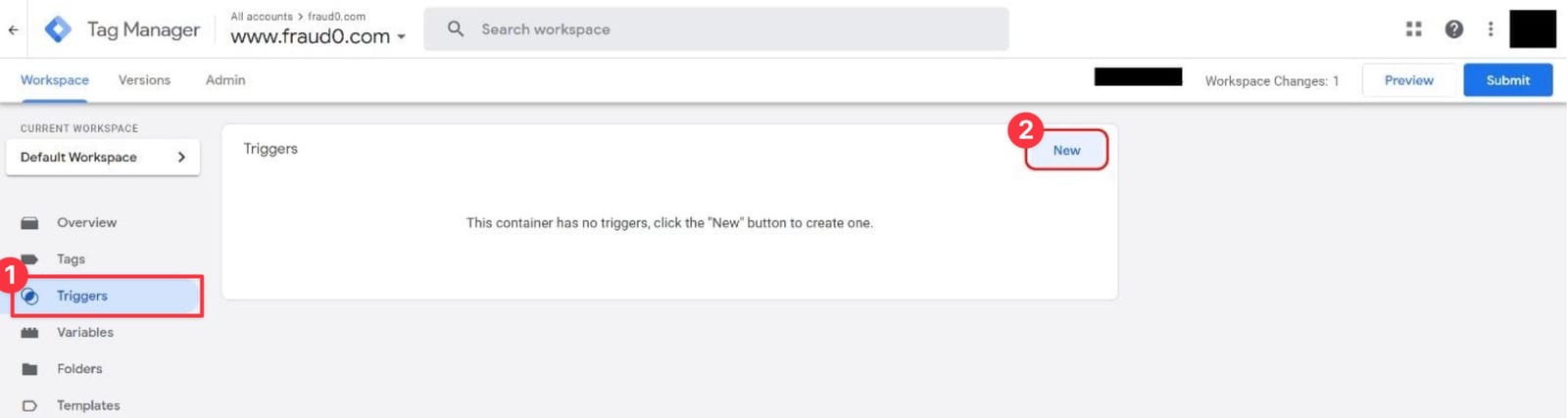
Go to your Google Tag Manager Workspace → Triggers → New.
-
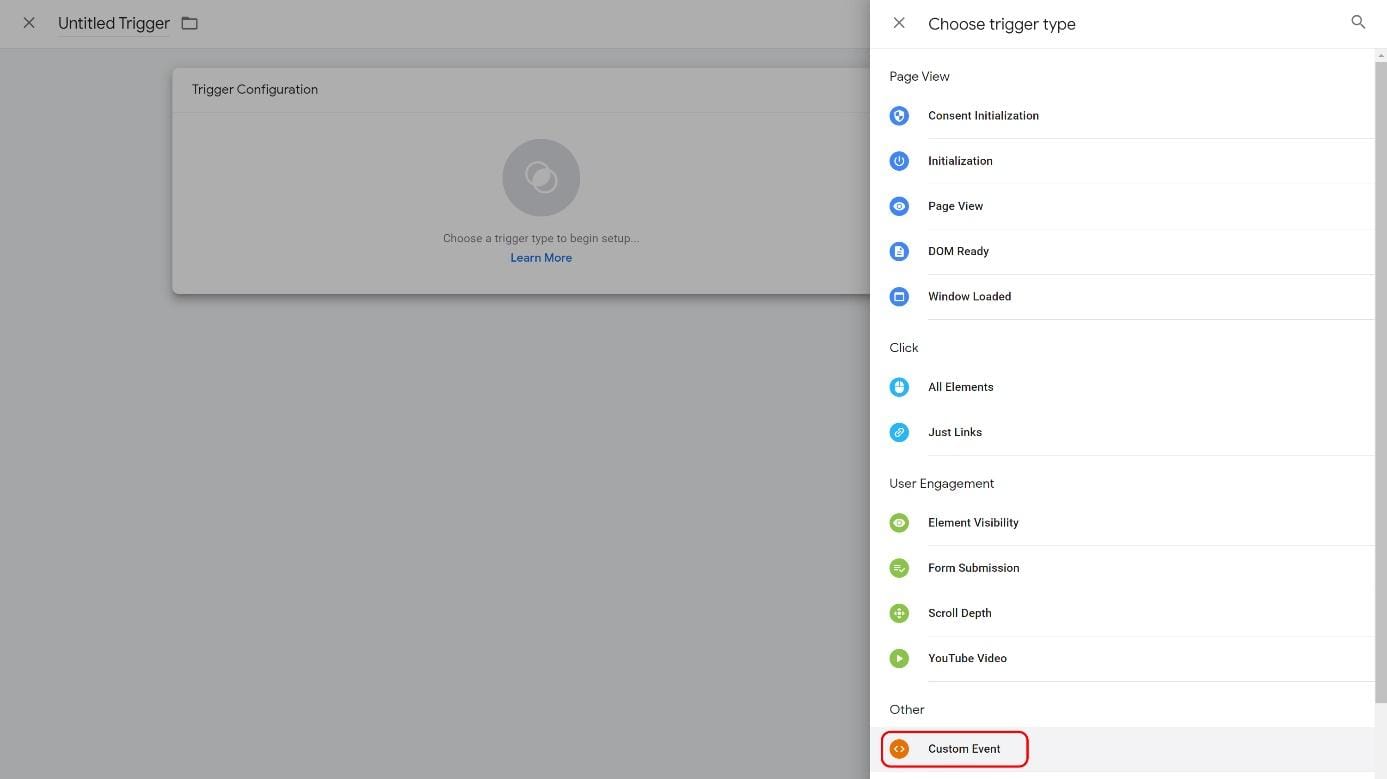
Configure the Custom Event
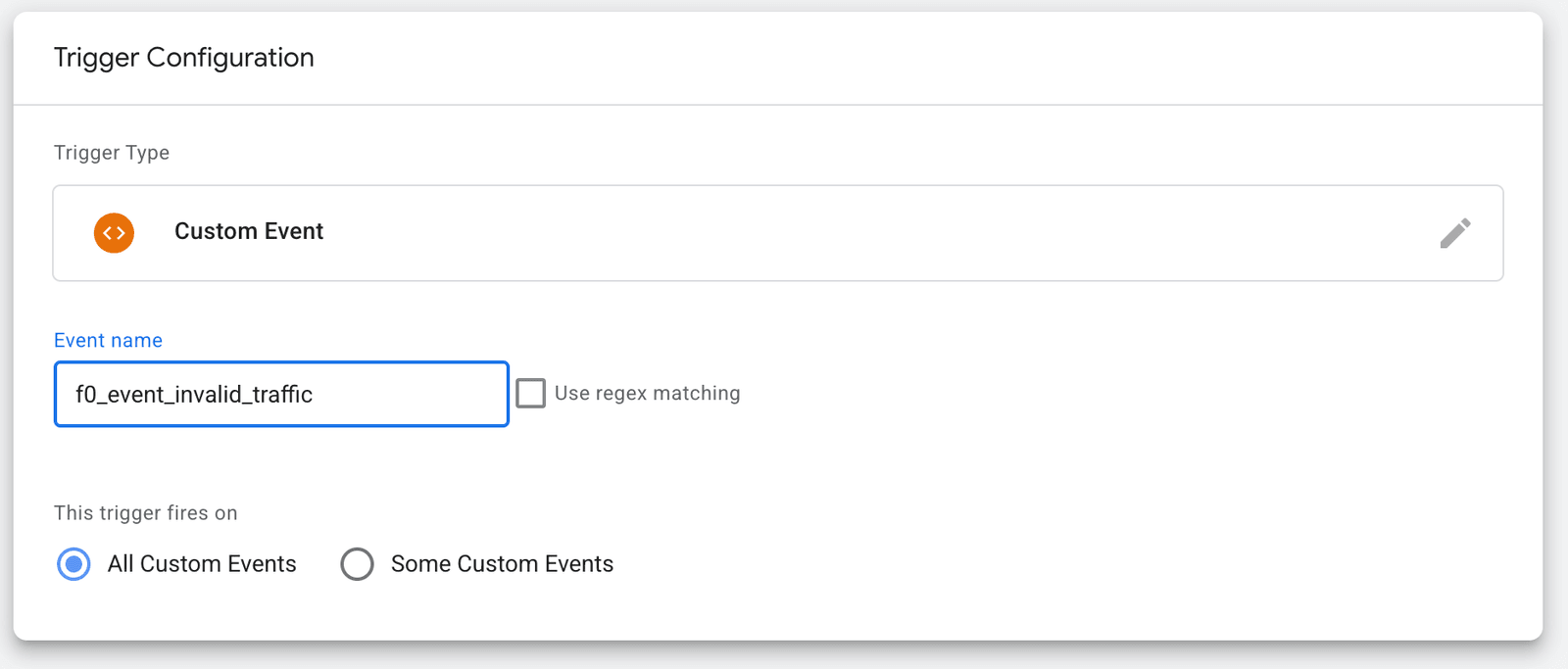
Select Custom Event as the trigger type. Name the trigger f0 Invalid Traffic Trigger and set:
- Trigger Type: Custom Event
- Event Name:
f0_event_invalid_traffic - This trigger fires on: All Custom Events
No condition or data-layer variable is needed — the event only fires for confirmed invalid bot traffic.
-
Click Save.
-
Verify in GTM Preview
Enter Preview mode and load your website. In the Tag Assistant debug panel, look for the
f0_event_invalid_trafficevent on visits classified as invalid bot traffic and confirm your trigger fires. Because the event is confirmed-bot-only, you may need to test from a context fraud0 classifies as a bot. The event is repeatable — it re-fires on each pageview or navigation while the visitor stays a confirmed bot, so build tags and audiences to treat it as such.
For more detail on fraud0’s data layer events, see Data Layer Events.
Optional: the fraud0 event and DLV F0 variable
Section titled “Optional: the fraud0 event and DLV F0 variable”Set this up in addition to the trigger above only if you need a yes/no classification of all traffic — for example, to drive the GA4 user property. The fraud0 event fires on every response and exposes the f0_bot_traffic value.
{ event: 'fraud0', f0_bot_traffic: 'no'}-
Create a Data Layer Variable
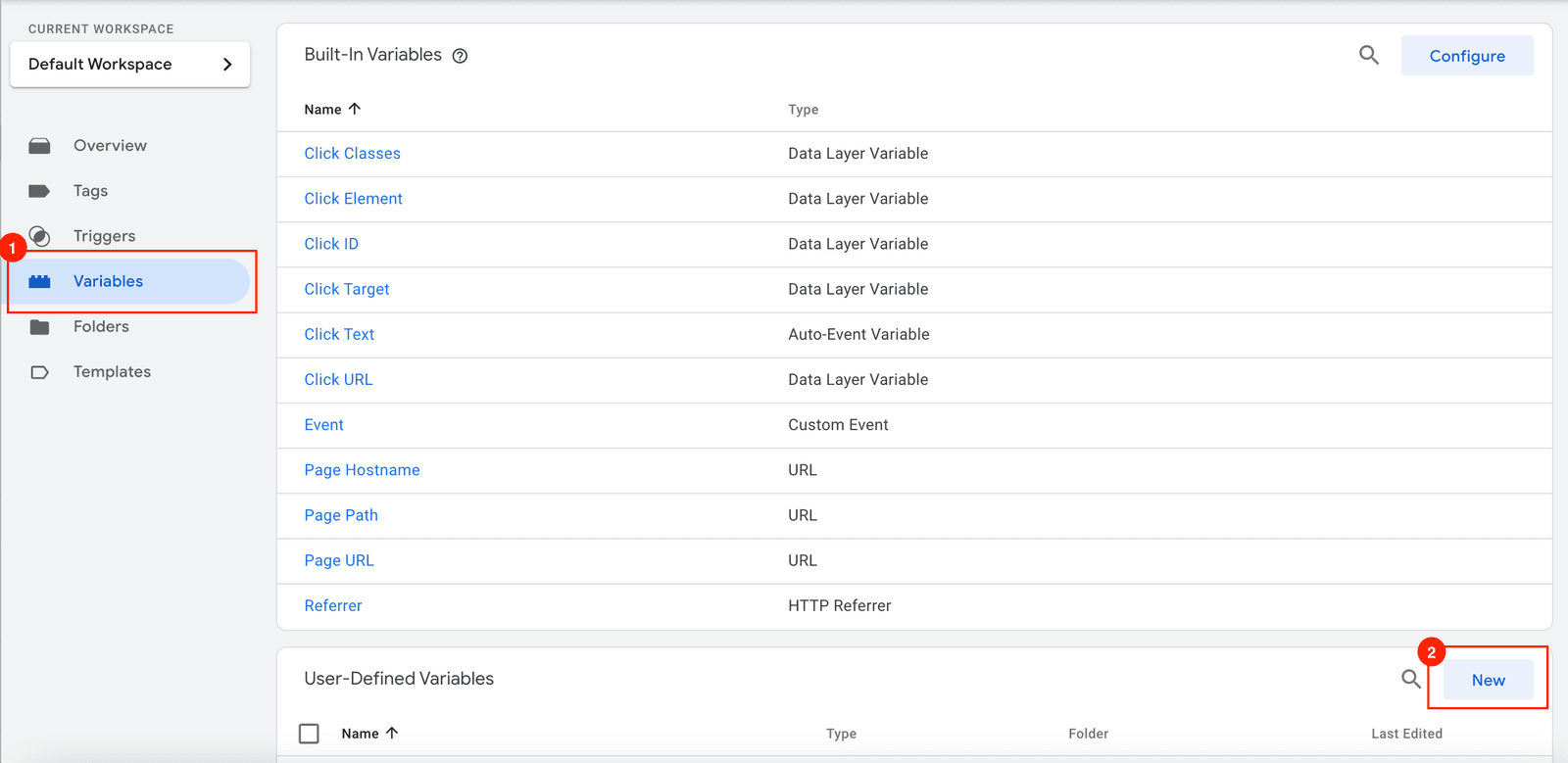
Go to Variables → New (under User-Defined Variables).
Set the Variable Configuration to Data Layer Variable. Give the variable the GTM label
DLV F0(this is the name you will select in tags and triggers) and set the Data Layer Variable Name to the fraud0 data-layer keyf0_bot_traffic(this is the key fraud0 pushes on thefraud0event). The names are case-sensitive — use this exact spelling.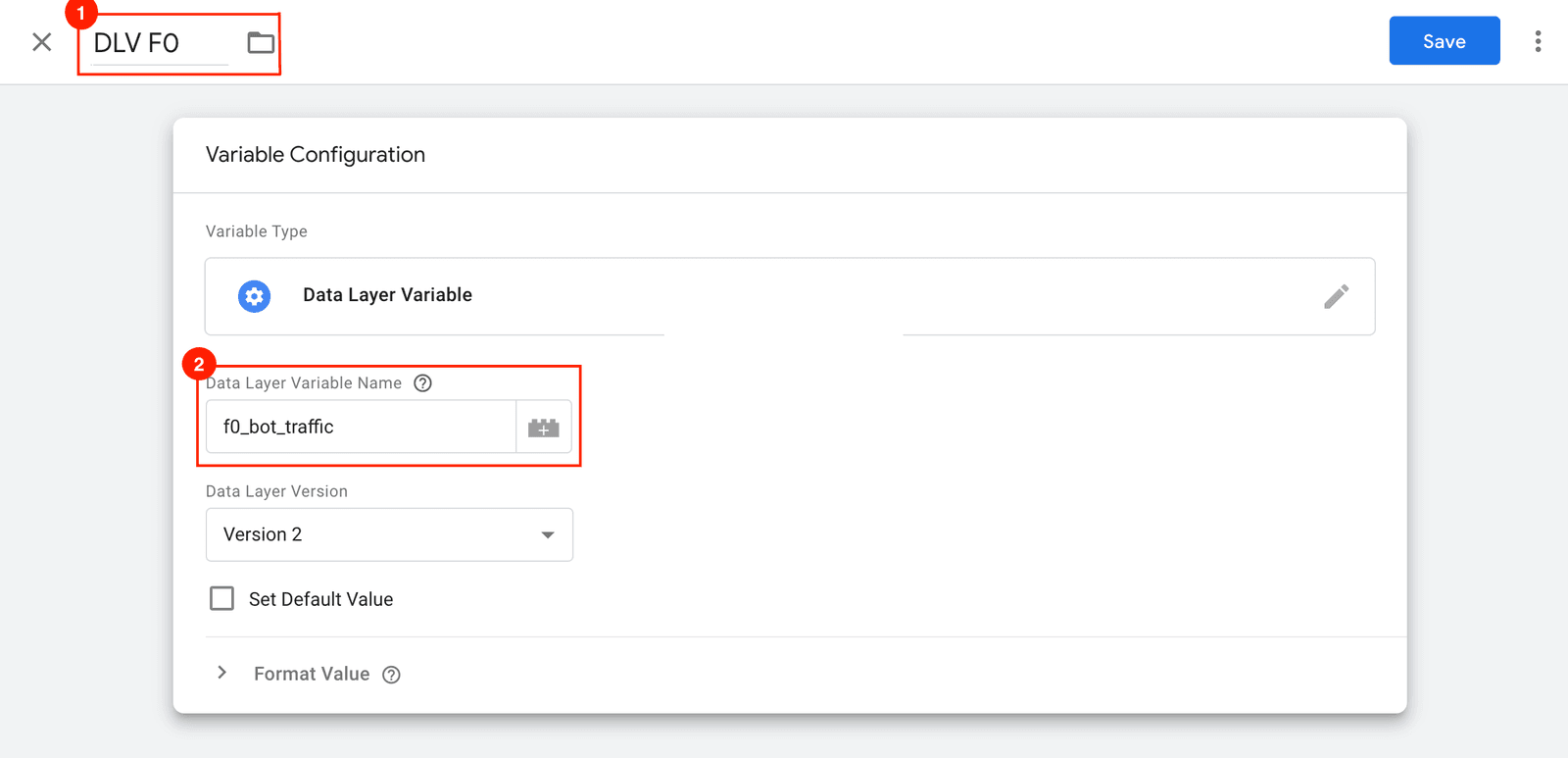
-
Click Save.
-
Create a Trigger
Navigate to Triggers → New, then select Custom Event as the trigger type. Name the trigger f0 Bot Traffic Trigger and set:
- Trigger Type: Custom Event
- Event Name:
fraud0 - Fire on: Some Custom Events
- Condition:
DLV F0equalsyes
-
Click Save.
-
Verify in GTM Preview
Enter Preview mode and load your website. In the Tag Assistant debug panel, select the
fraud0event, open the Variables tab, and confirm thatDLV F0resolves to eitheryes(invalid bot traffic) orno(human traffic). If it showsundefined, re-check that the Data Layer Variable Name is exactlyf0_bot_traffic.
5.3 Connect your ad systems
Section titled “5.3 Connect your ad systems”Once the Main Tag is verified and the GTM trigger is in place, connect at least one ad system so fraud0 starts protecting your spend.
5.4 Optional: Pixel Protect
Section titled “5.4 Optional: Pixel Protect”Once the Main Tag and at least one ad system are connected, Pixel Protect lets you go a step further — conditionally fire other pixels (retargeting, personalisation, session-based tools) only for verified human traffic, saving per-session costs and improving algorithmic optimisation.
Imprint Privacy Policy Terms & Conditions DPA